I’ve been reading a lot of reviews recently about the upcoming Banshee 1.0.  (Arstechnica and Linux Magazine, for example)  It looks like it’s going to be an awesome release, but I wanted to see where it is now and compare that to Rhythmbox.  As I mentioned here, I switched to Rhythmbox in May 2007 (a year ago!) from Banshee which I had been using approximately from May 2006 (when Mono programs were first introduced into Fedora).  Back then Banshee (and other Mono-based programs) were around version 0.1, but it was the new cool thing and everyone was talking about how awesome Mono would be for Linux.  (This is before everyone turned against it and Miguel de Icaza)  Eventually I left Banshee because it was slow and bloated (as are most Mono programs), couldn’t handle podcasts (which I had recently discovered), crashed when updating my large music library and when I changed Metadata it wouldn’t stay changed.  Since then Rhythmbox has been meeting all of my needs.  For Banshee to be worth switching to, it would have to provide all the features of Rhythmbox along with adding some new features.

So let’s take a look, feature-by-feature and see how they stack up.  For comparison purposes, I’m checking out Rhythmbox 0.11.3 vs Banshee 0.13.1 - these are the latest updated versions available in Fedora 8.  First of all, apparently Banshee is not able to detect when I’ve added new music into my music folder.  Both Rhythmbox and Amarok do this, so subtract points from Banshee from the start.

Here you can see the difference in the way the programs look when they are first started up:

Initial Screen on Both Rhytmbox and Banshee

First of all, from a user’s perspective, Rythmbox has nice, intuitive buttons.  Text appears under each button letting the user know what it does.  While no one will have any problems with Banshee’s play, forward and backwards buttons, I have no idea just by looking if it’s in random mode or in a mode to play straight through my music.

Also, right off the bat we see that in this version of Banshee, although it can Scrobble my music, it does not appear to have any last.fm support built-in.  By contrast, Rhythmbox comes with Neighbor Radio and the ability to add more radio stations based on similar artist, artist, and tags.  Very nice features.

Rhythmbox lastfm support

Banshee does finally have Podcast support, which is good.  Banshee is also lacking support for Magnatunes and Jamendo.  This is becoming a huge trend to provide a free version of the iTunes store.  (Even Amarok has support for Magnatunes)  So, here you can see what you get in Rhythmbox:

Rhythmbox Jamendo support

In addition to getting access to the Jamendo and Magnatunes catalogues for listening to, there are additional buttons added to the interface to facilitate the extra features of these services such as buying tracks or downloading albums.

Rhythmbox Magnatune Support

Looking at the radio selections, Banshee wins on the sheer number and variety of stations it provides “out of the box” so to speak.

Internet Radio support in Rhythmbox and Banshee

So I was just about to write off Banshee as a nice try, but something I’ll have to get back to when 1.0 finally comes out.  Then I decided to play a song….

Banshee playing a song

Here’s the kind of information being provided that makes me love Amarok!  I’m not sure if this information comes from last.fm, but here I get similar artists, top songs and top albums by the same artist!  Clicking on any of the songs from the top tracks switches over to that track.  What I’d love would be the ability to use that to create a playlist.  So instead of jumping to that song, I’d like to see it allow me to right click or middle-button click and get it added to a playlist.  After waiting for the song to end so I could scrobble it, I clicked on the items and they take you to the corresponding page on last.fm - so that must be where the info comes from.  I’d like to see that better integrated to include the functions I mentioned above.

Final verdict?  I think that Banshee has great promise to take over as my main audio program in the future.  Features such as the last.fm integration I mentioned above are just the kind of extra info I expect to get if I’m going to run a music player more complicated than XMMS.  However, I’d like to see better integration with last.fm radio, Jamendo, Magnatunes, and any other such programs.  I didn’t test podcasting since I have a ton of podcasts I’m currently following in Rhythmbox, but they appear to support it now. So I say stick with Rhytmbox for now if you want feature-completeness and keep a close eye on Banshee throughout the rest of 2008 to see what great suprises they have in store in 1.0.  Of course, if you’re a Mono-hater, then you’ll be stuck with Rhytmbox, but I don’t see those guys laying down on the job and I expect the feature set to continue to grow and get better.


Share and Enjoy:
These icons link to social bookmarking sites where readers can share and discover new web pages.

Share and Enjoy: These icons link to social bookmarking sites where readers can share and discover new web pages.
  • Digg
  • del.icio.us
  • Netvouz
  • DZone
  • ThisNext
  • MisterWong
  • Wists
  • De.lirio.us
  • Netscape
  • NewsVine
  • Reddit
  • Slashdot
  • StumbleUpon
  • Technorati

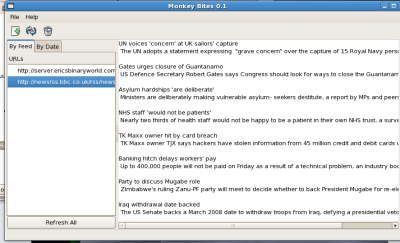
I’m pretty sure this is the first GUI program I’ve ever gotten to a useful state. No source code yet, as a lot of the buttons don’t work, but the basic functionality does. It’s a GTK-based RSS reader. I did it based off of code in LXF# 91. They called their Chomp. Since Mono is spanish for monkey, I called mine Monkey Bites. Enjoy some screenshots.


Click here to see my development environment as well as the running program.


Share and Enjoy:
These icons link to social bookmarking sites where readers can share and discover new web pages.

Share and Enjoy: These icons link to social bookmarking sites where readers can share and discover new web pages.
  • Digg
  • del.icio.us
  • Netvouz
  • DZone
  • ThisNext
  • MisterWong
  • Wists
  • De.lirio.us
  • Netscape
  • NewsVine
  • Reddit
  • Slashdot
  • StumbleUpon
  • Technorati

I’m including the file here. It’s just a command line RSS reader. The included readme file will tell you which parameters to pass it. It doesn’t really do a lot of checking or than for the words “sub” and “unsub”. It’s a pretty neat proof of concept. I’m not going to improve on it much at this stage because it’s going to be used in issue 91, I believe, to create a GTK application. It would be my first ever useful GTK application, so I’m pretty excited about it.RSS Reader


Share and Enjoy:
These icons link to social bookmarking sites where readers can share and discover new web pages.

Share and Enjoy: These icons link to social bookmarking sites where readers can share and discover new web pages.
  • Digg
  • del.icio.us
  • Netvouz
  • DZone
  • ThisNext
  • MisterWong
  • Wists
  • De.lirio.us
  • Netscape
  • NewsVine
  • Reddit
  • Slashdot
  • StumbleUpon
  • Technorati

It was another toy program, although a bit more useful than last time. It reads through a directory and recurses through subdirectories to fine all txt files and builds up a cache. Then it searches those for any text you want to search for.

Perhaps I missed a subtlety, but it appears to only search on one character searches as opposed to a whole word.

Next issue begins a real program - an RSS reader. Since I have that issue, I think I’ll do it tonight and then turn in for the night.


Share and Enjoy:
These icons link to social bookmarking sites where readers can share and discover new web pages.

Share and Enjoy: These icons link to social bookmarking sites where readers can share and discover new web pages.
  • Digg
  • del.icio.us
  • Netvouz
  • DZone
  • ThisNext
  • MisterWong
  • Wists
  • De.lirio.us
  • Netscape
  • NewsVine
  • Reddit
  • Slashdot
  • StumbleUpon
  • Technorati

Just tested and, yes, for the small, uncomplicated Hello World program it works just fine on Windows XP. I just had to install .NET. (It took about 10 minutes….I don’t know why)


Share and Enjoy:
These icons link to social bookmarking sites where readers can share and discover new web pages.

Share and Enjoy: These icons link to social bookmarking sites where readers can share and discover new web pages.
  • Digg
  • del.icio.us
  • Netvouz
  • DZone
  • ThisNext
  • MisterWong
  • Wists
  • De.lirio.us
  • Netscape
  • NewsVine
  • Reddit
  • Slashdot
  • StumbleUpon
  • Technorati

After reading Linux Format Magazine (LXF) Issue #91, in which they used Mono to code a GTK gui, I decided to take up C# programming. I will follow along with the tutorials and gain another programming language under my belt. Today I started with LXF #87 and completed my C# “hello world” program. The syntax is interesting - it’s a cross between C and Java. Of course, that makes sense as it lists those as its predecessors. Python (and Perl) is still much quicker for short programs, but for complex ones C# seems to be the way to go. At least, a lot of neat Gnome projects have been created with C# such as Banshee, Tomboy, and f-spot.

Also, according to LXF #91’s tutorial, building GTK (Gnome) applications with C# seems to be easy - relatively speaking. I mean, writing GUIs is such a PITA that most books on programming languages devote 1/56 of 1/42 of 1/101 of a chapter to it - if that much. It’s hard and it’s a different way of looking at programs. I’ve always resented my programming classes for that - after all - how many of today’s programs are GUI-less? With Linux I’ve learned to love and appreciate the command line and its lack of graphics, but there are still times when GUIs really help and I’ve always wanted to learn to create one.

So, here I go with Mono (linux’s reverse-engineering of MS’s .NET) and a new adventure with yet another programming language.


Share and Enjoy:
These icons link to social bookmarking sites where readers can share and discover new web pages.

Share and Enjoy: These icons link to social bookmarking sites where readers can share and discover new web pages.
  • Digg
  • del.icio.us
  • Netvouz
  • DZone
  • ThisNext
  • MisterWong
  • Wists
  • De.lirio.us
  • Netscape
  • NewsVine
  • Reddit
  • Slashdot
  • StumbleUpon
  • Technorati

The title of this post is, of course, a play on words. The company Ximian has developed Mono, an open source competitor to MS’s .NET. Mono is spanish (and probably latin) for monkey. The reason I’m excited is that according to Gnomedesktop.org , Fedora Core 5 will have mono! This means we’ll get great new programs being coded in Mono such as F-Spot, a photo organization program, and Beagle, an AMAZING search tool on par with the search tool in the latest Macintosh. Basically, it indexes the file system in such a way as to be able to look through not only filenames, but also tags in photos, music, and documents. Beagle even searches through AIM logs created by Kopete and Gaim. But the COOLEST thing is that, unlike the search in Windows which takes forever, this is instantaneous since it’s always indexing your computer. In fact, there are demos you can see by clicking on the beagle link on the right-hand side of my blog, that show a search being conducted and as the author write stuff in his IMs, it appears in the search. I can’t wait for this to be available to us Fedora users!

  
Mood: excited!

Share and Enjoy:
These icons link to social bookmarking sites where readers can share and discover new web pages.

Share and Enjoy: These icons link to social bookmarking sites where readers can share and discover new web pages.
  • Digg
  • del.icio.us
  • Netvouz
  • DZone
  • ThisNext
  • MisterWong
  • Wists
  • De.lirio.us
  • Netscape
  • NewsVine
  • Reddit
  • Slashdot
  • StumbleUpon
  • Technorati