Many people know the mantra - if you are a gamer or office worker, you use the OS from Redmond.  If you are a creative person such as a musician, video editor, etc you use a Mac.  Geeks use Linux.  But more and more people are moving away from Windows and seeking either Macs or Linux.  If you switch to Mac you have to spend a ton of money and if you switch to Linux, it’s free and you can use the hardware you already have.  But what if you’re a creative person?  Can you only go to a Mac?  Lots of people want to allow the creative people to come to Linux so there are more and more Linux distros for the creative types.  This month, in Linux Format Magazine, 64 Studio was bundled on the disc.  It doesn’t run as a liveCD or liveDVD so I’m running it in VirtualBox.  As you can see here, it is a Debian-based distro:

I haven’t installed Debian since Debian 3 when I installed it for my print/file server (luigi), so I’m not sure if the GUI installation begins this way, but strangely it appears to use the ncurces installation.

All the detection stuff continues in the ncurses screens.  Eventually it gets to the partitioning section.  It gives me two choices, Guided or Manual:

I go through all of the defaults including putting everything on one partition.  No biggie since I’m not planning to keep this forever as my studio box.  So it starts the partitioning and that takes a little while.  Then I set up my timezone, root password, username, and user password.  Finally it starts to install.  I think this is quite a bad idea for a Mac replacement.  There isn’t anything hard about it or bad about it, but then again, I’ve been installing Linux distros for something like 5 years now.  (wow!)  It’s just not pretty and Mac users like pretty.  I suggest moving to Anaconda or whatever it is that Debian’s using nowadays.

At first it died on ef2progs.  I restarted my installation.  (This isn’t necessarily their fault - might be a VirtualBox issue)  Once that was over and it rebooted, I was greeted with a very plain GDM screen.  In fact, I was floored at how plain it was for a studio-based distro.

So I logged in.   It took me a while to figure out what the background was.  (It is a guitar string up-close, isn’t it?)  It’s also, interestingly enough, they put Gnome on the bottom.  Since people using 64 Studio are probably coming from Macs, this seems to be a very interesting choice to me.

The preferences are in a really weird place compared to Ubuntu and Fedora.  (And most other Gnome-based Linux distros that I’ve used)   Usually they’re under the System menu, which has made a lot of sense to me.  You’re changing things about the system.  Here’s what it looks like:

Also, it’s strangely just coming out of the Gnome foot.  Will people know to just click on that?  I guess with the Macs I’ve used there’s the apple, but again, that’s at the top with Apple.  So there seems to be some kind of inconsistency where they are making it like apple where there’s just a little icon in the corner, but then they put the menu on the bottom.  (Which isn’t even standard for Gnome!)

On to applications.  Under internet they have Iceweasel instead of Firefox and Icedove instead of Thunderbird.  It’s the exact same program, but with different art and a different name.  Makes sense since it’s based on Debian.  I thinkperhaps they could use a little README file on the desktop explaining this to anyone coming from Mac or Windows so they know it’s the same thing as Firefox.

They have some very interesting choices for the office programs.   Abiword provides the wordprocessor and Gnumeric provides the spreadsheet.  OpenOffice.org is nowhere to be found.  It makes sense because 64 Studio is meant to be a creativity distro instead of a generic destkop distro.

When it comes to the applications included to make this a studio distro, they’ve got quite a few programs under graphics.

So they have some of the usual subjects like GIMP, Scribus, Inkscape, and (depending on the distro) Blender.  But they also have some programs I haven’t seen before such as K-3D, KToon, Stopmotion, and Xara Extreme.  Of course, Xara and Inkscape cover the same territory and the only reason I’ve ever heard for using Xara on Linux is because you’re used to Xara on your other platform.  I decided to see what K-3D, KToon and Stopmotion were about.

Up there you can see the startup of K-3D the first time I open it up.  Just on my absolute first impressions it appears to be designed to have a much friendlier interface than Blender.  It looks a lot less intimidating and you can see the shapes you’re going to create without having to right-click or something like that.  I’ve been using Blender for about 2 years now and now I find it very easy to use and quite natural.  But the first time I ever started it up, I closed it about five minutes later, frustrated.  I clicked a few buttons and came up with this.  I tried to render and it didn’t work.  But I didn’t feel like taking the time to figure it out.

I couldn’t quite figure out how KToon was supposed to work, but no biggie.  It’s nice that it’s there.  Here’s the Stopmotion GUI:

Stopmotion looks very interesting.  It appears as though you hook up your webcam (or other type of camera that you can tether to the computer) and then you hit the camera button over and over to capture each frame.  Sounds very, very tempting to try out and I’ll probably be installing it on my Fedora and Ubuntu computers.  Of course, under sound and video, there are a ton of applications, such as a synthesizer.  Unfortunately I couldn’t try it because the sound wasn’t working.  I’ll chalk that up to VirtualBox.

TerminatorX is a really cool DJ program I discovered.  I definitely want to check this out on my Fedora and Ubuntu computers.

So, what do I think of 64 Studio?  On the one hand, there doesn’t seem to be much of a difference on the surface between 64 Studio and just taking a vanilla Debian install and installing the same packages as 64 Studio.  On the other hand, there’s something to be said about a distro that already has all the packages installed and that you can just hand to a technologically-minded creative person and they can install it and start getting creative with free software.  Minus points for not having a graphical installer and minus points for having the menu bar at the bottom.  Also, it’s possible that a lot of the benefits of 64 Studio vs Vanilla Debian are below the surface.  If they have a custom kernel tuned for creativity and have the jack audio framework all setup for you already, then that’s a huge plus for them.  I’d definitely check it out, but you might also want to try Ubuntu Studio to see what they’re up to.


Share and Enjoy:
These icons link to social bookmarking sites where readers can share and discover new web pages.

Share and Enjoy: These icons link to social bookmarking sites where readers can share and discover new web pages.
  • Digg
  • del.icio.us
  • Netvouz
  • DZone
  • ThisNext
  • MisterWong
  • Wists
  • De.lirio.us
  • Netscape
  • NewsVine
  • Reddit
  • Slashdot
  • StumbleUpon
  • Technorati

Happy Birthday to the Compact Disc - it’s 25 today.

2 Days Ago, Happy 10th Birthday to Gnome

and Yesterday happy 14th Birthday to Debian


Share and Enjoy:
These icons link to social bookmarking sites where readers can share and discover new web pages.

Share and Enjoy: These icons link to social bookmarking sites where readers can share and discover new web pages.
  • Digg
  • del.icio.us
  • Netvouz
  • DZone
  • ThisNext
  • MisterWong
  • Wists
  • De.lirio.us
  • Netscape
  • NewsVine
  • Reddit
  • Slashdot
  • StumbleUpon
  • Technorati

For a while it seemed as though Debian couldn’t stop the hemorrhage of distros decided to be based on Ubuntu instead of Debian. For months on end people talked about whether Debian was still relevant and whether its long release cycle was to blame. Well, now it seems that perhaps some of those derivative distros were a little quick to jump on the bandwagon! SimplyMepis has decided to be based on Debian again.

The founder said that each time Ubuntu is build from scratch and it was hindering the ability of SimplyMepis to have a sensible upgrade path. I don’t know enough about that side of Linux distros to know how different that is from what most of them do, but apparently Debian does not have that problem.

I’m glad this is happening, not because I have any ill-will towards Ubuntu; on the contrary, my laptop runs Ubuntu. But because I felt that the Debian folks were unfairly getting a lot of slack simply because being based on Ubuntu was the cool new thing to do.

Of course, this will make that Linux family tree that keeps popping up on digg look pretty interesting.


Share and Enjoy:
These icons link to social bookmarking sites where readers can share and discover new web pages.

Share and Enjoy: These icons link to social bookmarking sites where readers can share and discover new web pages.
  • Digg
  • del.icio.us
  • Netvouz
  • DZone
  • ThisNext
  • MisterWong
  • Wists
  • De.lirio.us
  • Netscape
  • NewsVine
  • Reddit
  • Slashdot
  • StumbleUpon
  • Technorati

First of all, Debian has finally turned 4.0! It’s been YEARS in the making and they are 4 months late, but better late than never! Believe it or not, this is a huge improvement over the prior release cycle! With Ubuntu and Fedora releasing every sixth months now, it’s up to Debian to find a good compromise between releasing often and undoing their reputation as a nice stable distro to base other distros off of and not moving at glacial speed so that distros like Linspire/Freespire move to being based on Ubuntu.

Second, Gaim has been renamed Pidgin. When I first saw Gaim on the BSD machines in the engineering lab, I thought to myself, “what’s this G-AIM.” Well, apparently AOL didn’t like that. So they threatened legal action against the Gaim team. However, the way they tell it, since Gaim was Gaim before AOL IM was AIM, I’d think that Gaim would have the higher standing in court. However, I am neither that well versed in IP nor a lawyer. So they became Pidgin. This is supposedly also why they couldn’t release a 2.0 and they are supposed to be releasing it by the end of this week. I’m pretty excited they can get this out of the way because I hear some great stuff is planned for 3.0!


Share and Enjoy:
These icons link to social bookmarking sites where readers can share and discover new web pages.

Share and Enjoy: These icons link to social bookmarking sites where readers can share and discover new web pages.
  • Digg
  • del.icio.us
  • Netvouz
  • DZone
  • ThisNext
  • MisterWong
  • Wists
  • De.lirio.us
  • Netscape
  • NewsVine
  • Reddit
  • Slashdot
  • StumbleUpon
  • Technorati

As you may have heard recently, Debian has a problem with Firefox due to the fact that the artwork is not released under a free license. This is an extension of problems they’ve had with GNU’s documentation and the clause that allows some parts to remain uneditable. So Debian has forked Firefox into IceWeasel. The engine and core program are the same, only the artwork is different.

This has caused a lot of name-calling back and forth between the two camps. Mark Shuttleworth, who’s Ubuntu is based in Debian, posted a reconcilatory post today whereby he called on both sides to respectfully disagree.

Both groups really, genuinely mean well. I know this because I’ve spent some time working with both of them. Both care deeply about free software and both want to see the world improved through the wide availability of high quality software that comes with the right to change it. So it is a little frustrating to see this level of public tension between two groups that have come to represent, each in their own way, something iconic about free software.

First, let me say that both groups are being entirely reasonable about their positions. Debian has every right to insist that it have the freedom to ship the package in the form that it deems most appropriate for its users, and Mozilla has every right to protect its trademarks.

Spoken as a true businessman/mediator.


Share and Enjoy:
These icons link to social bookmarking sites where readers can share and discover new web pages.

Share and Enjoy: These icons link to social bookmarking sites where readers can share and discover new web pages.
  • Digg
  • del.icio.us
  • Netvouz
  • DZone
  • ThisNext
  • MisterWong
  • Wists
  • De.lirio.us
  • Netscape
  • NewsVine
  • Reddit
  • Slashdot
  • StumbleUpon
  • Technorati

that’s it! Debian is now done installing! Much better!


Share and Enjoy:
These icons link to social bookmarking sites where readers can share and discover new web pages.

Share and Enjoy: These icons link to social bookmarking sites where readers can share and discover new web pages.
  • Digg
  • del.icio.us
  • Netvouz
  • DZone
  • ThisNext
  • MisterWong
  • Wists
  • De.lirio.us
  • Netscape
  • NewsVine
  • Reddit
  • Slashdot
  • StumbleUpon
  • Technorati

The Fedora install was going so well…it was on disc 3 with nary a problem. Then it had the same problem again. For some reason, in the middle of the install it rebooted the laptop again. Frankly, I’m not down with these 3 day installs. Sorry, but my laptop’s days with Fedora have passed. Basically, every time I try to reinstall Fedora I know I’m going to have similar problems. It’s just too slow to endure these kinds of installs. So I’m switching over to Debian on my laptop where upgrades do not require reinstalling the entire system. You just point to a new repo and update your packages as usual. Fedora will remain on my nice fast computer.


Share and Enjoy:
These icons link to social bookmarking sites where readers can share and discover new web pages.

Share and Enjoy: These icons link to social bookmarking sites where readers can share and discover new web pages.
  • Digg
  • del.icio.us
  • Netvouz
  • DZone
  • ThisNext
  • MisterWong
  • Wists
  • De.lirio.us
  • Netscape
  • NewsVine
  • Reddit
  • Slashdot
  • StumbleUpon
  • Technorati

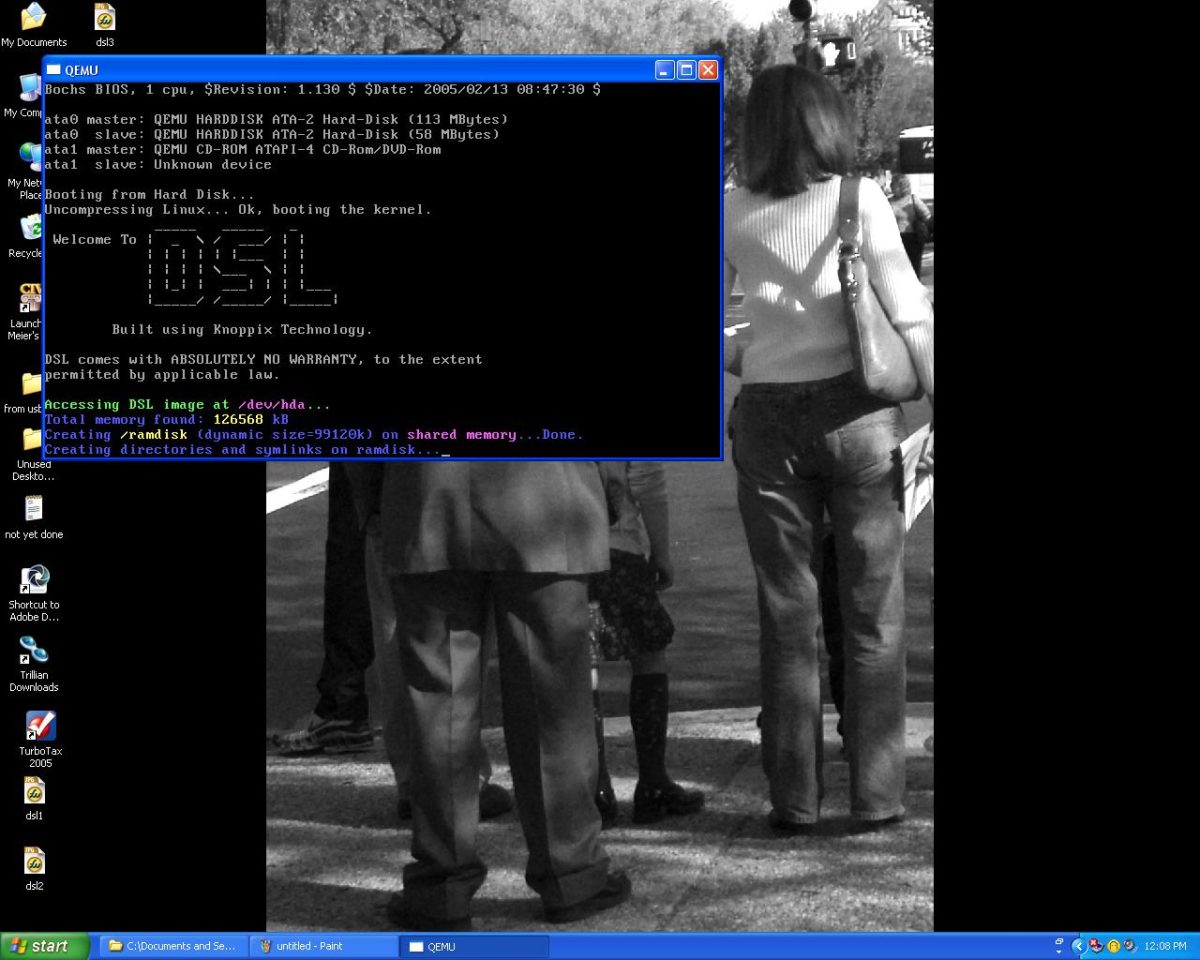
What does DSL mean to you? If you’re a technological person, it might mean Digital Subscriber Line, a way to access the internet. If you’re not a technological person….well, just ask my sister-in-law what it means to her. But to Linux users, DSL has even a third meaning, Damn Small Linux. What is Damn Small Linux? It is an entire Linux distrobution that fits on a 50 MB “business card” CD-ROM. It’s based on the Live CD technology devised by Klaus Knopper of Knoppix fame. He has created a phenomenon by perfecting the idea of having an operating system running entirely in the user’s RAM. This allows you to use Linux wherever you go, no matter what computers are available, and you won’t be touching the underlying system!

DSL Starts Up

Well, DSL is based on the same idea, but much smaller. Why? There are two basic reasons: First of all, this allows the OS to run on Legacy systems that don’t have a lot of RAM. Second, it allows you to have an ENTIRE OS on a memory stick! How great is that? I’d heard of DSL for a long time, but hadn’t thought of a good reason to use it. Then I read this blog post about it, and realized it’s power. Not only that, but I learned about a new mode of using it - via QEMU on a computer already running windows. I quickly downloaded the ISO (for burning to CD) and the zip file for running in Windows. I must say that I was VERY impressed!

DSL 1

DSL 2

On my computer, which has 1.5 GHz and 1 Gb of RAM, it ran very well, even though an OS running emulated through QEMU runs 6 times slower than if it was installed on the computer! So don’t use it in QEMU mode on a 486, use the Live CD for that. The only annoying thing was the the mouse movements were a little off. Firefox also ran very slowly compared to other apps, but it is a much larger application. I think it was included mostly for being such a well known application.

DSL 3

DSL Starts Up

I ran into a small problem when switching in and out of DSL in order to take these screenshots where I would lose the ability to type in DSL. After a while, the ability just returned, so I’m not sure of the cause. As you can see, Dillo did not properly render my blog, while Firefox did. I didn’t have the time to try out the ISO, but at least in the embedded version, run Firefox only if you REALLY need to be able to see pages correctly. If they are simple or have mostly text, you should be fine with Dillo.

Just as Knoppix gave birth to DSL, DSL has given birth to Hikarunix! This is a live CD OS based on DSL which contains all of the best Linux software related to the game of Go. I learned about it from this post by Techn0manc3r. And so you see, Linux doesn’t have too many distros, it doesn’t have enough of them! There’s nothing wrong with having a distro dedicated to playing Go or for any other purpose someone can think of.

DSL Shuts Down


Share and Enjoy:
These icons link to social bookmarking sites where readers can share and discover new web pages.

Share and Enjoy: These icons link to social bookmarking sites where readers can share and discover new web pages.
  • Digg
  • del.icio.us
  • Netvouz
  • DZone
  • ThisNext
  • MisterWong
  • Wists
  • De.lirio.us
  • Netscape
  • NewsVine
  • Reddit
  • Slashdot
  • StumbleUpon
  • Technorati